
Remote administration has become an essential part of modern business operations. Administrators, IT teams, developers, and support professionals often need secure access to Windows-based environments from different locations. A Windows VPS can provide a practical environment for this purpose, while a Windows VPS RDS CAL can help organizations properly license Remote Desktop Services when multiple users or sessions require access.
Understanding how these components work together can make remote administration more organized, manageable, and compliant. Whether managing applications, monitoring servers, configuring software, or supporting users, a properly configured remote Windows environment can simplify many everyday tasks.
Understanding Windows VPS Remote Administration
A Windows VPS is a virtual private server that runs a Windows operating system within a virtualized infrastructure. Unlike a traditional desktop computer located in an office, a VPS can be accessed remotely through an internet connection. This allows authorized administrators to work with server resources without being physically present at the data center.
Remote administration may involve tasks such as installing applications, managing user accounts, reviewing system settings, configuring services, maintaining databases, or monitoring server performance. Windows provides familiar administrative tools that can make these tasks easier for professionals who already work within the Microsoft ecosystem.
For organizations with distributed teams, a Windows VPS can also provide a consistent working environment. Administrators can connect to the same server environment from different locations while maintaining centralized access to applications and resources.
What Is a Windows VPS RDS CAL?
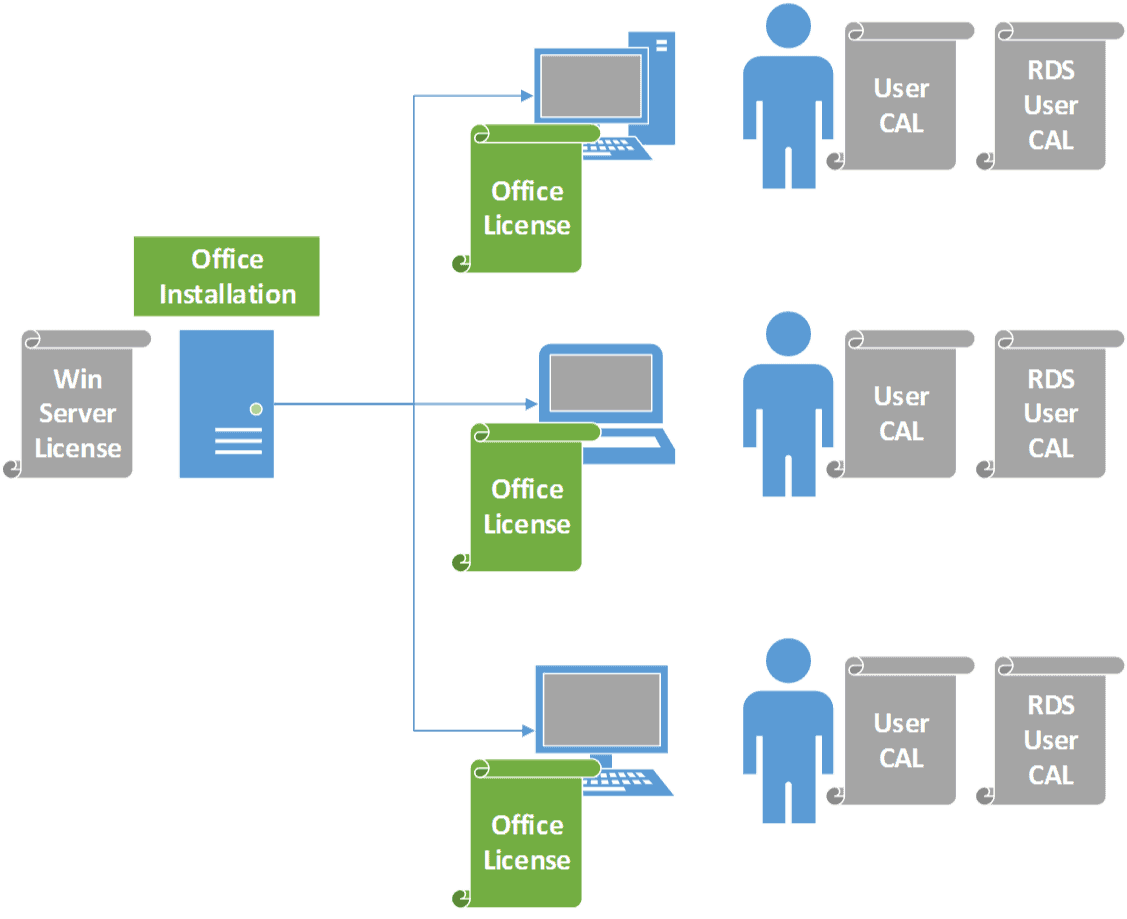
A Windows VPS RDS CAL is a licensing component associated with Microsoft Remote Desktop Services. RDS allows users to access Windows-based desktops or applications remotely. A Client Access License, commonly known as a CAL, provides the licensing rights required for eligible users or devices to access Remote Desktop Services according to Microsoft’s licensing terms.
There are generally user-based and device-based licensing approaches for RDS. The appropriate option depends on how an organization structures its remote access.
For example, an administrator who connects from several devices may have different licensing considerations from a company where several employees share a dedicated workstation. Organizations should review the applicable Microsoft licensing requirements and select the appropriate licensing model rather than assuming that a standard Windows VPS license automatically includes every RDS entitlement.
Why RDS Matters for Everyday Administration
Remote Desktop Services can provide a graphical interface that makes Windows server administration convenient. Instead of relying entirely on command-line tools, an administrator can interact with the Windows environment through a remote desktop session.
Everyday tasks may include checking system configurations, installing approved software, managing folders, reviewing application behavior, and performing routine maintenance. For teams already familiar with Windows desktops, remote graphical access can reduce the learning curve associated with server management.
RDS can also support centralized administration. Rather than maintaining separate environments on multiple local computers, an organization can host certain applications and resources on a central Windows VPS and provide authorized remote access.
Setting Up a Windows VPS for Administration
A reliable setup begins with selecting an appropriate Windows VPS configuration. CPU resources, memory, storage, bandwidth, and operating system version should match the expected workload.
After deployment, administrators should establish secure credentials and configure the server according to organizational requirements. Unnecessary services should be reviewed, software should be kept updated, and administrative accounts should be carefully controlled.
Remote access should be limited to authorized users. Strong passwords, multi-factor authentication where supported, network restrictions, and other security controls can help reduce unnecessary exposure.
If Remote Desktop Services is being used beyond the licensing included with the Windows Server environment, administrators should also review the relevant RDS licensing requirements and Windows VPS RDS CAL arrangements.
Managing Multiple Remote Users
One advantage of Remote Desktop Services is its ability to support structured remote access for multiple authorized users. This can be useful when an IT department needs several administrators or employees to access a centralized Windows environment.
However, user management becomes increasingly important as the number of remote connections grows. Each user should have only the permissions necessary for their responsibilities. Separate accounts are generally preferable to sharing a single administrator account because they make access management and auditing more practical.
Administrators should also consider server resources. Multiple simultaneous sessions consume memory, processing capacity, storage, and network resources. A VPS designed for a single administrator may not provide the same experience when several users connect at once.
Security Considerations for Remote Administration
Remote administration introduces security responsibilities because the server may be reachable over the internet. Protecting the remote access interface should therefore be a fundamental part of deployment.
Administrators should use strong authentication methods and keep Windows and installed applications updated. Firewall rules can restrict unnecessary network traffic, while network-level security controls can reduce exposure.
Account permissions should be reviewed regularly. Former employees, temporary users, and inactive accounts should not retain unnecessary access.
Logging and monitoring can also provide useful visibility. Reviewing authentication activity and unusual connection patterns may help administrators identify potential security issues earlier.
A Windows VPS RDS CAL addresses licensing rather than serving as a security product, so licensing and security should be treated as separate aspects of a complete remote administration strategy.
Benefits for Distributed IT Teams
Remote administration becomes especially valuable when teams operate across different offices, cities, or time zones. A centralized Windows VPS can give authorized administrators access to a consistent environment without requiring them to work from the physical server location.
This arrangement can also support maintenance outside normal office hours. Administrators may be able to connect remotely when updates, configuration changes, or troubleshooting tasks need to be performed.
Centralization can simplify certain operational processes as well. Applications and administrative resources can be maintained in one controlled environment instead of being distributed across many individual computers.
Choosing the Right Licensing Approach
Licensing should be considered before deploying an RDS-based environment. The number of users, number of devices, access patterns, Windows Server edition, and intended use can all affect licensing requirements.
Organizations should consult current Microsoft licensing documentation or a qualified licensing professional before purchasing or deploying Windows VPS RDS CALs. Licensing rules can change, and requirements may differ depending on the specific Microsoft products and services being used.
This approach helps prevent situations where an organization builds a technically functional remote environment but discovers later that its licensing configuration does not match its actual usage.
Maintaining a Reliable Remote Environment
Once a Windows VPS is operational, regular maintenance remains important. Administrators should monitor resource usage, apply security updates, review user accounts, check available storage, and verify that essential services are operating correctly.
Backups should also be planned according to the importance of the information stored on the server. A backup strategy should consider recovery objectives, retention periods, and the possibility of hardware, software, or user-related failures.
Documentation can further improve administration. Keeping records of configurations, authorized users, applications, and maintenance procedures can make troubleshooting easier and help other members of the IT team understand the environment.
Making Remote Administration More Efficient
A well-organized remote administration environment combines appropriate hardware resources, secure access practices, sensible user permissions, reliable maintenance, and correct licensing.
Windows VPS environments can be particularly useful for teams that prefer the Windows interface and need centralized remote access. When Remote Desktop Services is part of the setup, understanding the role of Windows VPS RDS CAL is important for planning access and licensing correctly.
Ultimately, everyday remote administration works best when technology and operational procedures are considered together. With a properly configured Windows VPS, carefully managed remote access, appropriate RDS licensing, and ongoing security practices, administrators can maintain their Windows environments efficiently from virtually anywhere.